ArriveCAN
- 4.9
- Rating
- 5.00M
- Installs
- Free
- Price

 Analysis by App-foxy
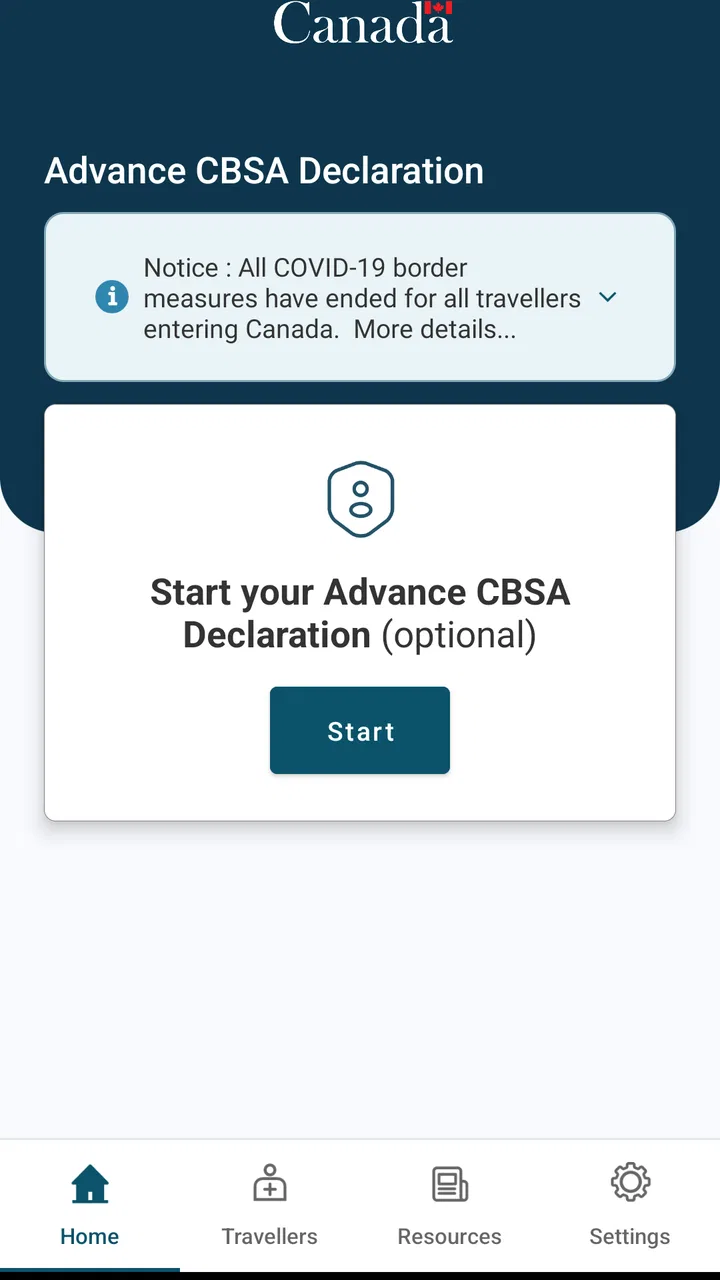
When I travel to Canada, I want the arrival formalities handled before I am standing in a slow-moving line with a phone battery that is already running low. ArriveCAN is built for that specific moment: it lets incoming travellers submit the information required for their arrival in Canada through a mobile app instead of treating the process as something to solve at the border. I see it as a practical travel companion rather than a general trip planner, booking service, or digital passport wallet.
That narrow purpose is also its biggest strength. The app comes from CBSA-ASFC, the Canadian Border Services Agency, and sits in the Travel & Local category. It is free, rated for Everyone, and the current version is 3.6.11. The app has been available since Apr 21, 2020, and works on Android 7.0 or later. Those details matter in a household because an older spare phone may still be suitable, while a device that has not been updated for a long time may need attention before the trip.
How ArriveCAN fits into a shared travel day
My most realistic use case is a household preparing for a holiday or visiting relatives in Canada. One person may organize the route, another may hold the passports, and a third may be responsible for keeping the travel documents and confirmation details together. ArriveCAN can fit into that routine, but I would not treat it as a shared family dashboard. I would use one person’s phone to prepare the required submission carefully, then make sure the other travellers know what was entered and where the resulting information can be found.
You May Also Like

 Blood Strike: 2.5 Anniversary
Blood Strike’s Loadouts Turn Every Drop Into a Tactical Gamble
A close look at Blood Strike’s custom loadouts: how fast access to signature weapons reshapes its battle royale rhythm, rewards preparation, and narrows the gap between fights.

 Pandora - Music & Podcasts
Pandora’s Music Is Easy to Start, but Harder to Recover
Pandora’s strength is its low-effort path from a seed to a station. Its weak spot is how much confidence it asks you to place in connection, setup, and quiet recovery.

 8 Ball Pool
 Is Built on Rivalries, Rematches, and Routine
A close look at the rivalries, rematches, shared routines, and unanswered safety questions that turn a quick pool match into a persistent mobile community.

 Samsung Music
’s Quiet Strength Is Playing What You Already Own
Its reach comes less from spectacle than from dependable access to a personal library. That simplicity is both the app’s strongest retention engine and its ceiling.

 AccuWeather: Weather Radar
AccuWeather Review: A Quick, Clear Forecast for Everyday Decisions
For everyday plans, the best forecast is the one you can understand quickly. AccuWeather makes rain timing, radar, and local conditions easy to act on, with a few trade-offs.

 Hill Climb Racing
Why Hill Climb Racing Still Turns Crashes Into One More Run
A tiny car, a bumpy hill and one more upgrade: Hill Climb Racing keeps resurfacing because its simple chaos makes every near-miss feel personal.
More From Our News Desk
View All News


That distinction prevents a common mistake: assuming that installing the app on every family member’s device automatically creates coordination. It does not replace a conversation about who is responsible for the submission, who will carry the phone, and what happens if the main device is unavailable. Before leaving home, I would tell everyone in the group which traveller is handling the app and keep the relevant travel documents accessible to that person.
For a couple travelling together, this is simple. One partner can complete the process while the other checks names, document details, and travel dates. For a larger household, the review step becomes more important. Children, older relatives, or anyone who is less comfortable with smartphones may depend on another traveller to enter information accurately. I would slow down rather than hand the phone around randomly, because switching between people while filling out official travel information is an easy way to overlook a field.
The app is especially useful when the person coordinating the journey is comfortable with digital forms but does not want to rely on memory at the last minute. Completing the task before reaching the border gives the group a chance to notice a spelling issue or missing detail while there is still time to check the original documents. It also makes the arrival routine feel more organized, even though the app itself is not a replacement for the other documents or checks required for travel.
One phone or several?
For a shared-device household, I would start with one designated phone rather than installing the app everywhere. That keeps responsibility clear and avoids creating several partially completed attempts. If two adults prefer to work together, one can operate the device and the other can read from the documents and verify each entry. This is more reliable than passing the phone between a group of tired travellers in an airport lounge.
A second device can still be sensible as a backup for access to the completed information, but I would not assume that copying an app installation copies a submission or creates a common household record. The safe habit is to understand exactly where the completed travel information is displayed and to keep the responsible traveller’s phone charged. I would also avoid uninstalling the app immediately after submission if the group may need to refer back to it during the journey.
This is one of the less obvious trade-offs of a focused government travel app. Its limited scope makes the workflow easier to understand, but it also means I have to provide the household organization around it. There is no reason to expect it to manage flights, hotel bookings, packing lists, or family messaging. I use those tools separately and keep ArriveCAN reserved for the arrival information it is designed to collect.
Setting it up without crossing account boundaries
When several people share a tablet or phone, I would be careful about whose information is being entered. A device can be shared, but the travel submission still concerns real individuals. I would not let a child casually experiment with the form, and I would not leave the phone unlocked while personal travel details are visible. The practical boundary is simple: the adult responsible for the journey prepares the information, and each traveller checks the parts that relate to them.
I also prefer to complete the process in a quiet place with the passports or other travel documents beside me. Doing it in a car, at a crowded terminal, or while answering questions from several relatives creates unnecessary pressure. A useful household routine is to make a small checklist outside the app: traveller names, document details, itinerary information, and the phone that will be carried on arrival. The checklist is not a substitute for the app; it is a guard against entering information from memory.
Because ArriveCAN is an official travel utility, I would treat every screen as a form that deserves a careful read rather than tapping through quickly. If an answer seems unclear, I would stop and verify it using the relevant travel documents or official guidance. The app can streamline submission, but it cannot decide which personal answer is correct for a traveller. That remains the responsibility of the person completing the form.
Another practical point is device readiness. The minimum operating-system requirement is Android 7.0, so the app may suit older Android phones that are still maintained. I would check compatibility before the travel day, update the phone if appropriate, and make sure the person carrying it knows how to open the app. This is particularly helpful for an older relative who may use a borrowed device only for the trip.
Coordinating the group before arrival
I find the app most valuable when it is part of a clear travel handoff. The organizer completes the information, another adult reviews it, and the group agrees on who will present the phone if it is needed. That small amount of coordination matters more than having multiple people claim they have “taken care of it.” In a family, vague responsibility is often the real source of last-minute stress.
For a household with separate travel plans, I would keep the submissions conceptually separate. A parent travelling with children should not assume that a submission prepared for one group automatically covers relatives arriving on another itinerary. Likewise, two adults who share a home but travel at different times should each confirm that their own travel details are represented correctly. The app is about incoming travellers, so the information must match the people and journey being handled.
I would also explain the process to anyone who may be asked about it at arrival. A teenager may be able to operate the phone but may not know why the information was entered. An older family member may understand the trip perfectly but prefer not to navigate a mobile form. In both cases, a short explanation avoids confusion: one adult is managing the digital submission, while every traveller remains responsible for answering questions about their own journey when required.
There is a useful difference between coordination and duplication. Coordination means checking the entries, sharing responsibility for the device, and knowing where the completed information is. Duplication means creating several competing versions without knowing which one is current. I recommend the first approach. It is easier to audit and less likely to leave the group wondering whether the final version was actually completed.
For travellers who normally use paper notes, email, or a browser search for government forms, ArriveCAN offers a more direct mobile workflow. The advantage is convenience during preparation and arrival. The limitation is that a phone-based process introduces its own points of failure: a dead battery, an unfamiliar device, or a traveller who cannot access the information. I would therefore keep the usual travel documents available and avoid treating the app as the only thing that matters.
Age, trust, and who should operate it
The Everyone content rating makes the app broadly suitable from an age-classification perspective, but that does not mean every traveller should complete it without supervision. Official travel information is a trust issue, not a game or casual social app. I would let a capable teenager help read details or check a screen, but I would want an adult to make the final submission for a family trip. The same principle applies to grandparents, guests, or anyone borrowing a phone for the journey.
There is no need to turn this into a complicated family-control arrangement. The useful boundary is human: decide who is authorized to enter information, who verifies it, and who keeps access to the device. If a child owns the only compatible phone, an adult can still supervise the process and retain responsibility for the information. If an older traveller is the main passenger, I would make sure they understand what the app is doing rather than quietly completing everything on their behalf.
Trust also matters when a household shares accounts or devices. I would avoid leaving travel information open for anyone to browse, especially on a phone used by several family members. After the arrival process is finished, I would follow the device’s normal privacy habits, such as using a screen lock and not handing the phone to strangers. These are sensible precautions for any official travel information, and they are more useful than assuming the app itself will solve every privacy concern.
For a solo adult traveller, the age and trust questions are straightforward: install it on a personal device, read each prompt, and keep the phone available. For a group, the app becomes less about individual convenience and more about assigning a dependable operator. That is where my experience of the workflow changes. The software may be simple enough, but the household still needs a plan.
What the strong adoption tells me—and what it does not
ArriveCAN has a 4.8 average from around 164 thousand ratings, with about 1.2 thousand written reviews, and it has passed 5 million installs. Those figures suggest that many travellers find the app useful enough to keep and rate positively. I read that as a sign that it solves a real administrative problem, not as a guarantee that every trip will be frictionless.
The high rating should not make anyone skip the careful parts of the process. A travel app can be well liked and still feel inconvenient when a family has unusual circumstances, a last-minute change, or a traveller who needs help with digital forms. Ratings describe broad user satisfaction; they do not remove the need to check each submission against the actual journey.
I also appreciate that the app is free. That makes it easier for a household to use the intended official channel without adding another travel expense. Still, free does not mean effortless. The real cost is attention: gathering the correct details, checking the entries, and making sure the responsible phone is ready when the group arrives.
Where it beats ordinary alternatives
The usual alternative is to search for the relevant government process in a mobile browser, follow a saved note, or wait until arrival to deal with the formalities. A browser can be flexible, especially for someone who prefers a larger screen, but it may leave the traveller hunting through tabs and bookmarks. ArriveCAN gives the task a dedicated place on the phone, which is helpful when the trip involves several people and the organizer wants one obvious workflow.
Compared with a paper checklist, the app is better at putting the official submission process in front of me. Paper is still useful for planning and backup, but it cannot replace the digital step when the travel process expects information to be submitted through the app. Compared with a general travel organizer, ArriveCAN is less versatile but more focused. I would not use it to manage reservations or a day-by-day itinerary; I would use it alongside those tools.
The focused design is also why I would not recommend it as the only travel app for a household. A family may still need maps, airline or rail information, accommodation details, translation help, and a shared messaging channel. ArriveCAN handles one important administrative lane. It does not become a complete travel command center, and expecting it to do so would make the experience seem worse than it is.
Small habits that make the workflow safer
My first tip is to assign a primary operator before opening the app. My second is to choose a verifier who is looking at the original documents, not merely agreeing that the screen “looks right.” My third is to prepare before the group is tired or distracted. These habits sound basic, but they address the real weaknesses of shared-device use: unclear ownership, rushed reading, and misplaced confidence.
I would also keep the phone charged and avoid relying on a traveller who may hand their device to someone else during the journey. If the organizer is travelling with children, I would explain that the phone is being used for official arrival information and should not be closed, reset, or passed around casually. If the organizer is travelling with an older relative, I would write down the name of the responsible person and keep the travel documents together so the handoff is obvious.
Another useful habit is to review the completed information as a group without turning the review into a public display. The goal is accuracy, not showing everyone every personal detail. One adult can compare the submission with the documents while the other travellers confirm their own names and journey details. Once that check is done, the group should know which phone holds the information and who will operate it.
If plans change, I would not assume that an earlier submission remains correct. I would reopen the app and examine the relevant information rather than relying on a screenshot, memory, or an old message. This is especially important for families whose members split up or change travel arrangements. The more a group’s itinerary differs from the original plan, the more valuable a deliberate review becomes.
Finally, I would not use a third-party imitation simply because it appears first in a search result. The developer shown for this app is CBSA-ASFC, so I would check that I am using the official application before entering personal travel information. That is a practical trust check for anyone installing it on a shared household device.
Who should choose it and who should look elsewhere
I recommend ArriveCAN to incoming travellers who want a dedicated way to submit the necessary arrival information before reaching Canada. It is particularly suitable for a household with one organized adult who can prepare the submission, verify it with the group, and keep the phone accessible. It also makes sense for travellers who prefer an app over searching through a browser each time they need the process.
I would be more cautious if your group has complicated travel arrangements, frequent changes, or someone who cannot comfortably review digital forms. The app may still be part of the solution, but you should add human checking and keep the normal travel documents close. If you only want a complete itinerary manager, a booking organizer or shared calendar will serve you better. If you dislike handling official forms on a phone, a larger-screen or browser-based workflow may feel more comfortable, provided it meets the current travel requirements.
People travelling together but arriving separately should also avoid treating the app as a single household checkbox. Each journey needs to be considered on its own terms. A shared home address does not automatically mean identical travel details, and a shared phone does not automatically mean shared responsibility. That is the main boundary I would explain before a family trip.
My household verdict
After looking at ArriveCAN as both a travel tool and a shared-device app, I see it as a focused, worthwhile utility. It does one job instead of trying to become a full travel suite, and that focus makes it easier to include in a pre-arrival routine. The free price, Everyone rating, broad device compatibility, and strong user response all make it approachable for ordinary travellers.
My recommendation comes with one condition: treat it as an official form, not a casual checklist. Choose the person responsible for the phone, verify the entries with the travellers and their documents, and keep a sensible backup plan for access to the rest of your travel information. That approach works well for couples, families, and mixed-age groups without pretending that the app can coordinate every part of a journey.
For me, the best reason to install it is simple: it moves an important arrival task into a controlled preparation step instead of leaving the household to improvise at the border. The app will not organize the entire trip, and it cannot replace careful travellers, but it can make the Canadian arrival workflow more deliberate and manageable. Used with clear household responsibility, it is an app I would keep ready for an incoming trip.
FAQs for ArriveCAN
01What is ArriveCAN and why do I need it?
ArriveCAN is a mobile application developed by the Government of Canada to help travelers comply with COVID-19 entry requirements. It allows users to submit mandatory travel information, such as contact details and quarantine plans, before arriving in Canada. Failure to use the app can result in delays or penalties at the border.
02Is ArriveCAN available for both Android and iOS?
Yes, ArriveCAN is available for download on both Android and iOS devices. You can find it on the Google Play Store for Android users and the Apple App Store for iOS users. Ensure your device meets the minimum operating system requirements for a smooth experience.
03Do I need to use ArriveCAN if I'm a fully vaccinated traveler?
Yes, even if you are fully vaccinated, you are required to use ArriveCAN. The app is mandatory for all travelers entering Canada, regardless of vaccination status, to provide essential information regarding travel and vaccination records. This helps facilitate safe and efficient entry into the country.
04What kind of information will I need to submit on ArriveCAN?
On ArriveCAN, you will need to submit your travel and contact information, quarantine plan, and COVID-19 vaccination records, if applicable. The app also requires details about your travel history and destination. Providing accurate information can streamline your entry process and avoid any issues at border control.
05Is the information I provide on ArriveCAN secure?
Yes, the information you provide on ArriveCAN is secure. The app is designed to protect your personal data in compliance with Canadian privacy laws. Only authorized personnel have access to your information, which is used solely for public health purposes and to ensure compliance with entry requirements.
Pros
- Streamlined travel documentation.
- Easy to use interface.
- Real-time updates on travel protocols.
- Secure data handling.
- Efficient for frequent travelers.
Cons
- Requires internet connection.
- Limited offline functionality.
- Occasional app glitches.
- Data entry can be repetitive.
- Not all languages supported.

ArriveCAN
Gallery